
Timemark: Photo Proof for Work
OG Co.Photography
4.8392.00 Reviews
- Version
- v10.0.210
- Installs
- 10.00M
- Age Rating
- Everyone
Screenshots
Our Review of Timemark: Photo Proof for Work
 Analysis by Appyee
When work depends on photographic proof, a normal camera roll can become surprisingly difficult to manage. Pictures get mixed with personal shots, dates are easy to overlook, and remembering where a photo was taken may require a separate note or message. Timemark: Photo Proof for Work is built around that practical problem. It is a free photography app from OG Co. that focuses on capturing, collecting, and organizing job photos with a timestamp and geotag.
I see it as a focused tool rather than a replacement for every camera app. Its appeal is strongest when a photo needs to support a record of work: a completed installation, a site visit, a delivery condition, a maintenance task, or a before-and-after check. The app is listed for Everyone, runs on Android 8.0 and later, and the current release is v10.0.210. That makes it accessible to people using a wide range of Android phones, although the usefulness of any location-based record still depends on how carefully the user handles the workflow.
What Timemark adds to ordinary work photos
I find it helpful to judge Timemark by the gap between taking a picture and being able to explain it later. This section looks at how adding time-and-place context can make an ordinary work photo more useful, while also showing where a careful capture routine still matters more than any app.
A camera workflow designed around evidence
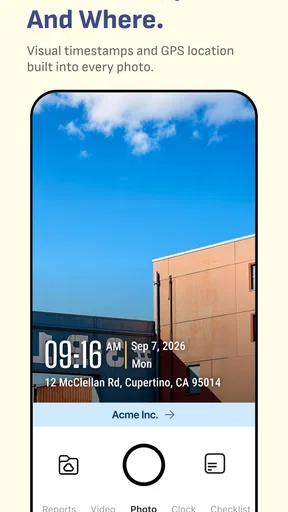
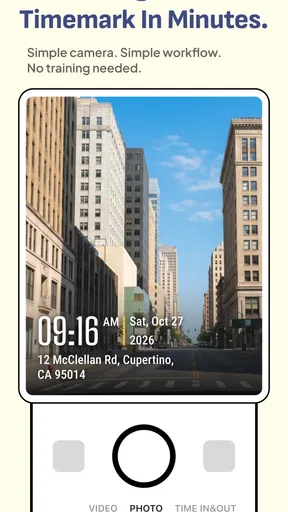
The most important difference is the way the app frames a photograph as part of a job record instead of merely an image. A regular camera is excellent for taking pictures quickly, but it leaves the organization to the user. You may need to rename files, add notes elsewhere, check the map separately, or scroll through a crowded gallery later. Timemark puts the timestamp and geotag at the center of the capture process, which is much closer to how field documentation is actually used.
In my experience, that distinction matters most after the job rather than during it. While working, taking a picture feels simple. The friction appears hours later, when several similar rooms, machines, entrances, or parcels need to be identified. A visible time and location context can reduce the guesswork. It also gives the person reviewing the images a quicker way to understand when and where the work happened.
This makes the app particularly relevant to contractors, inspectors, property managers, delivery workers, technicians, cleaners, and small teams that need a straightforward visual trail. It can also help an individual homeowner documenting repairs or a renovation, even though the strongest case is professional field work.
Why the timestamp and geotag are more useful together
A timestamp alone can tell me when I took a picture, but not necessarily where. A geotag can indicate a place, but it does not explain the order of events. Together, they create a more useful snapshot of a visit. For example, when documenting several properties in one day, the time helps separate visits while the location helps connect each image to the correct address or site.
There is a practical workflow hidden in that combination. I can begin a site visit by photographing the initial condition, capture progress as the task develops, and finish with the completed result. Later, the sequence is easier to understand without relying entirely on memory. This is one of the app’s less obvious strengths: it can make a series of ordinary pictures feel like a chronological record.
That does not automatically make every image legally sufficient or universally accepted as proof. A timestamp and geotag provide useful context, but a client, employer, insurer, or authority may have its own documentation requirements. I would treat Timemark as a way to improve consistency and traceability, not as a guarantee that a photo will satisfy every formal standard.
Collecting job images instead of mixing them with personal photos
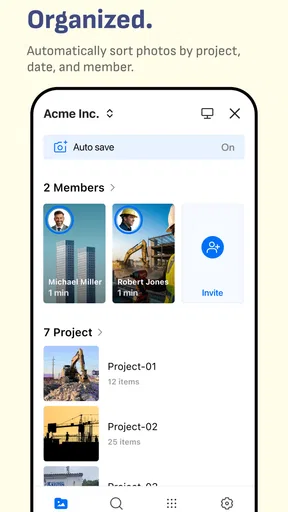
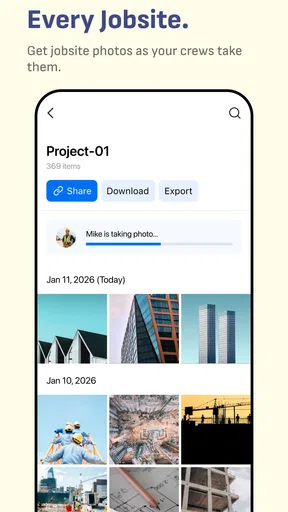
The store positioning emphasizes collecting and organizing job photos, and that focus is important. A separate work-oriented space can be easier to manage than a general camera roll, especially for people who use the same phone for personal and professional life. Keeping work images together reduces the chance of sending the wrong picture, overlooking an earlier condition, or wasting time searching through unrelated memories.
A useful habit is to pause before each new task and decide what the photo needs to prove. If the goal is to show arrival, take a clear establishing image. If the goal is to show a defect, include enough surrounding context to identify the location. If the goal is to show completion, capture the finished result from a comparable angle. The app can preserve time and place, but it cannot replace deliberate framing.
This is also where I would avoid overusing it. Photographing every tiny step can create a large collection that is just as confusing as an unorganized gallery. The better approach is to use a repeatable pattern: starting condition, important work stage, final condition, and any detail that might later answer a question. Timemark is most valuable when the capture process is selective.
How it compares with a standard camera and cloud gallery
A standard camera usually wins for creative control, speed, and familiarity. If I am taking portraits, recording a personal event, or looking for advanced photographic adjustments, a dedicated camera app is likely the better choice. A cloud gallery may also offer stronger searching, sharing, editing, and backup tools. Those alternatives are more general, while Timemark is aimed at the documentation side of photography.
The trade-off is specialization. Timemark’s value comes from reducing the number of separate steps needed to create a work photo with time and location context. A normal camera may require me to take the picture first and organize the evidence later. A general gallery may store the image safely but still leave me to explain what happened at the site. For someone whose main need is job documentation, that focus can be more useful than a longer list of creative features.
On the other hand, users who already have a disciplined system combining a camera, file naming, cloud folders, and job-management software may not gain enough to justify changing habits. The app is not automatically better simply because it is specialized. Its advantage appears when the existing process is inconsistent, slow, or dependent on memory.
Cost, value, and the practical trade-offs
I’d weigh the free starting point against the work you expect the app to do every week. Here I consider how to test whether Timemark earns a place in your routine, including the trade-off between a focused photo record and the broader tools some jobs or teams may need.
What free access means here
Timemark is free to install and use as an app, which makes it easy to test against a real workday before committing to it. That matters for solo workers and small businesses that do not want to pay upfront for a documentation tool without knowing whether it fits their routine. The age rating is Everyone, so the listing presents it as broadly accessible rather than restricted to a mature audience.
The app also offers in-app purchases ranging from $1.49 to $59.99 per item. I would not assume that every useful capability requires payment, nor would I assume that the free experience includes everything a professional team may want. The sensible way to judge the value is to begin with the free access, use it on several representative jobs, and identify whether the paid options solve a real limitation in your workflow.
That distinction is important: free access lowers the risk of trying Timemark, but it does not by itself prove that the full professional workflow is free. If you need the app for occasional documentation, the no-cost entry may be enough. If you plan to depend on it for daily business records, examine the purchase choices inside the app before building your entire process around features you have not tested.
Where the value is strongest
The app delivers value by saving small amounts of attention repeatedly. A single photo may not justify a specialized tool. Hundreds of work photos can. If the app helps me avoid manually sorting images, checking separate location information, or reconstructing the order of a visit, those saved moments add up across a week.
There is also value in consistency. A team can encourage workers to capture site evidence in the same general way, even if the app does not replace formal project-management procedures. Consistent images are easier to review than a collection where one worker includes a location, another adds a note in a messaging app, and a third sends pictures with no context at all.
For a small operator, that consistency may be more valuable than advanced editing. A clean, well-contextualized photo can answer a client’s basic question quickly. It can also help the worker remember what happened at a busy site. In that sense, Timemark is less about making photographs beautiful and more about making them useful later.
Limitations I would consider before relying on it
The first limitation is that location context is not the same as complete documentation. A geotag may identify the general place, but it cannot explain which room, unit, floor, or piece of equipment appears in the frame. I would still include visual landmarks and use a consistent sequence, particularly when several tasks happen close together.
The second is that a timestamp does not remove the need for clear communication. A photo taken at the right time and place can still be too dark, too distant, or poorly framed to prove anything. Users who expect the overlay or metadata to do all the work may be disappointed. The app supports a good process; it cannot rescue careless photography.
Privacy is another practical consideration. Work images connected to locations may reveal customer addresses, private property, or sensitive job details. Before sharing a collection, I would review every image and consider whether the location information is appropriate for the recipient. This is especially important when a client only needs visual confirmation and not the full geographic context.
There is also a workflow trade-off for teams. A solo worker can decide immediately how to photograph and organize a job. A larger company may need naming conventions, permissions, approval steps, retention rules, or integration with existing systems. Timemark may still be useful as the capture layer, but I would not treat it as a complete replacement for a company’s broader record-keeping setup.
Three habits that make the app more effective
Use a repeatable photo order. Start with a wide image, follow with the relevant detail, and finish with the completed condition. The timestamp then supports a sequence that is understandable instead of merely decorative.
Photograph reference points. When a geotag cannot distinguish nearby units or rooms, include a doorway, label, sign, meter, or other visible identifier in the frame. This small step closes a gap that location data alone cannot solve.
Separate capture from review. At the end of a visit, quickly check whether the key condition is visible and whether the image belongs to the correct job. Finding a weak photo while still on site is far easier than discovering it after leaving.
These habits also reveal the app’s proper role. It is not a magic proof generator. It is a practical structure for a careful documentation routine. The people who benefit most will be those willing to combine its time-and-place context with thoughtful framing and sensible organization.
Who should use it, and who should skip it
I would recommend trying Timemark if your work involves repeated visits, changing conditions, handoffs, deliveries, inspections, or customer questions about what happened on a particular day. It is especially appealing when you currently rely on a personal gallery and often have to remember which image belongs to which job. The free entry makes experimentation reasonable, while the photography focus keeps the purpose clear.
It may also suit a person who works alone and wants a lightweight record without adopting a large business platform. A technician can use it to document a repair visit, a property manager can record maintenance conditions, and a delivery worker can preserve the state of an item at a particular place. In each case, the benefit comes from reducing ambiguity around the image.
I would skip it if your main goal is artistic photography, advanced editing, social publishing, or managing a large media library with sophisticated search and backup requirements. A conventional camera and gallery may be more comfortable there. I would also hesitate if your organization already has a mandatory field-service system and workers must capture images inside that platform. Adding another capture route could create duplicate records instead of simplifying the job.
Before choosing a paid option, I would test the app on the hardest realistic scenario rather than an easy one. Try a day with several nearby locations, similar-looking rooms, changing conditions, and a need to send a clear record afterward. That test will tell you more than a quick indoor snapshot because it exposes whether the timestamp, geotag, collection process, and review habits genuinely fit your work.
My final judgment on Timemark
Timemark: Photo Proof for Work is a focused answer to a common documentation problem: making job photos easier to connect to a time and place. I like that its purpose is practical and easy to understand. It does not ask the user to turn ordinary work into a complicated media-management project; instead, it centers the details that are often missing when pictures are taken quickly in the field.
Its value is clearest for people who need reliable context more than creative controls. The free access is a sensible reason to test it, while the available in-app purchases mean regular professional users should evaluate the paid value carefully rather than assuming the free and paid experiences are identical. The app’s 4.8 average from around 880 thousand ratings and over 10 million installs suggest that it has reached a substantial audience, but popularity should not replace a trial with your own jobs.
My recommendation is to install it if your current photo process feels improvised, especially when you regularly need to prove what was done, where it happened, and when. Use a consistent capture pattern, include visible reference points, and review the collection before leaving each site. If you need a full project-management system, advanced camera controls, or highly formal evidence handling, choose a more specialized alternative or use Timemark only as one part of that system.
For the right user, the app’s strongest feature is not a dramatic visual effect. It is the quiet reduction of uncertainty after the work is finished. That is a worthwhile benefit, and it is enough for me to recommend giving this photography tool a fair test before deciding whether its optional purchases belong in your regular workflow.
Verdict
Strengths of Timemark: Photo Proof for Work
- Creates timestamped photo evidence for work records.
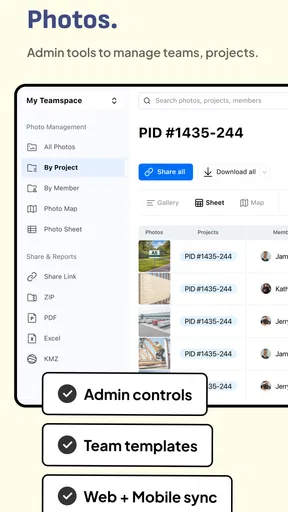
- Helps organize proof by project, task, or location.
- Useful for documenting progress, inspections, and completed jobs.
- Can support clearer communication with clients and supervisors.
- Reduces reliance on handwritten notes and separate photo folders.
Limitations of Timemark: Photo Proof for Work
- Photo evidence may require extra time during busy jobs.
- Accuracy depends on device time, GPS, and camera permissions.
- Some features may be limited without a paid plan.
- Sensitive job photos could raise privacy and data-security concerns.
- Poor connectivity may affect syncing or access to records.
Similar Picks in This Category
View All
Google Photos
Google LLC4.4

Gallery
Google LLC4.2

Picsart AI Photo Editor, Video
PicsArt, Inc.3.9

B612 AI Photo&Video Editor
SNOW Corporation4.1

BeautyPlus-Selfie Photo Editor
PIXOCIAL TECHNOLOGY (SINGAPORE) PTE. LTD.4.5

Remini - AI Photo Enhancer
Bending Spoons4.1
Frequently Asked Questions
What is Timemark: Photo Proof for Work used for?
Timemark: Photo Proof for Work is designed to help professionals document tasks and job-site conditions with photos that include useful proof details, such as the time and location associated with the capture. It can be useful for inspections, deliveries, construction updates, maintenance visits, field service, property management, and other situations where ordinary camera images may not provide enough context.
How does Timemark add proof information to photos?
The app generally combines the captured image with supporting information, such as a timestamp, date, location, or other job-related details, depending on the available settings and device permissions. Before relying on the result for a dispute or official report, users should review the preview carefully and confirm that the phone’s clock, GPS, and selected project information are accurate.
Does Timemark require GPS, camera, or other permissions?
Yes, the main features require access to the camera, while location access may be needed when you want photos to show where the work was performed. The app may also request permission for photo storage or media access so images can be saved and shared. You can manage these permissions in Android or iOS settings, but disabling them may limit the app’s functionality.
Can photos created with Timemark be shared with clients or used in work reports?
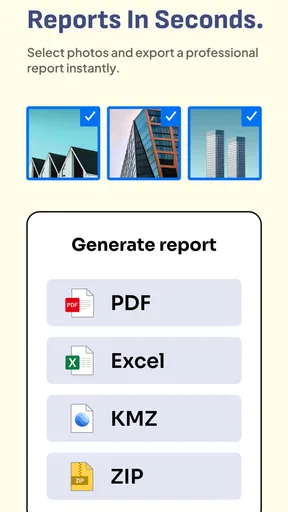
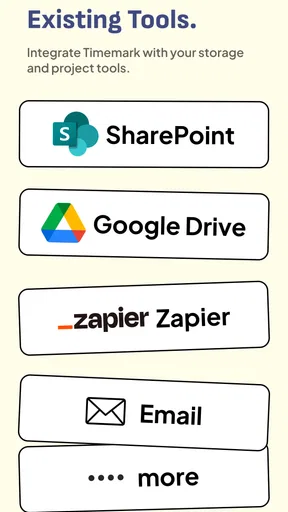
Photos can typically be saved to the device and shared through common tools such as email, messaging apps, cloud storage, or workplace platforms. This makes Timemark practical for sending progress evidence, inspection records, and completion updates. However, the exact sharing options depend on your phone, operating system, app version, and any export or subscription restrictions that may apply.
Is Timemark: Photo Proof for Work free to use?
Availability of features may depend on the app’s current pricing model, platform, and version. Some functions may be offered without charge, while advanced tools, higher usage limits, branding controls, or additional business features could require an in-app purchase or subscription. Check the Google Play or App Store listing before downloading, especially if you need Timemark for regular professional work.
